The problem
You hold an open house and people sign in on a clipboard. Or an owner wonders what their home is worth and has no easy way to ask you. Building a page for each takes time you do not have.
What it does
On November 26, 2026, My Sites in realtor mode got two new starter pages, each with a lead form:
- Open house. A sign-in page for visitors at your open house.
- Home value request. A page where owners ask what their home is worth.
How to use it
- Open My Sites (app.leedagent.com/sites) and press New page.
-
Choose Use a template. The list for realtors starts with Realtor home page, About you, Your services and Contact page, then Open house and Home value request.
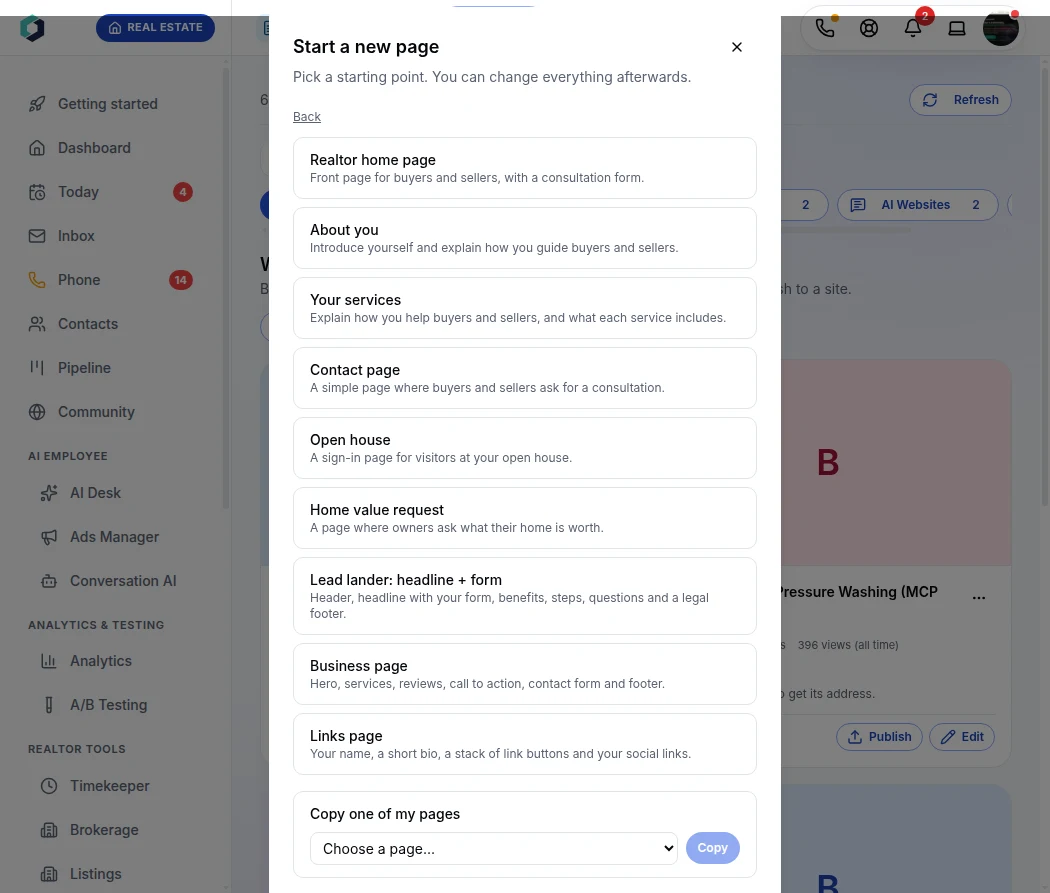 Open house and Home value request in the template list.
-
Pick one, change the words and photos, and publish it when you are ready. The new page shows in My Sites as a draft until you press Publish. In the editor, the form has name, email and phone fields (Open house also asks if they want similar homes; Home value request asks for the property address and when they plan to sell), and you can edit or add fields.
Who has it
Realtor mode starts at Solo. Free and Free Plus get General mode only. Plans are on the pricing page.
Try it
Open My Sites and start a page. No account yet? Start free.