The problem
The board is great for moving a deal from one stage to the next. It is not great when you want to answer a plain question: which deals are worth the most, which ones did I touch last, which are still sitting at the first stage? With cards spread across columns, you scroll sideways and compare by eye.
What it does
As of November 17, 2026, the pipeline has a List view next to Board. It shows your deals as one table, one deal per row, with these columns: Deal, Stage, Value, Assigned to, Last updated and Created. Click a column heading to sort by it.
The board is still there and is still the default. Nothing changes until you press List.
How to use it
-
Open Pipeline in the left menu. You land on the board.
 The Board | List switch, top right of the Pipeline page.
-
Press List. The page address ends in
?view=list, so you can bookmark it. -
Your deals show as a table. The Stage column keeps the same colored dot as on the board. The same search box, update-time filter and All / Open / Won / Lost buttons sit above it.
-
Click Value to sort by deal value, biggest first. An arrow next to the heading shows which way the list is sorted. Click it again to flip the order.
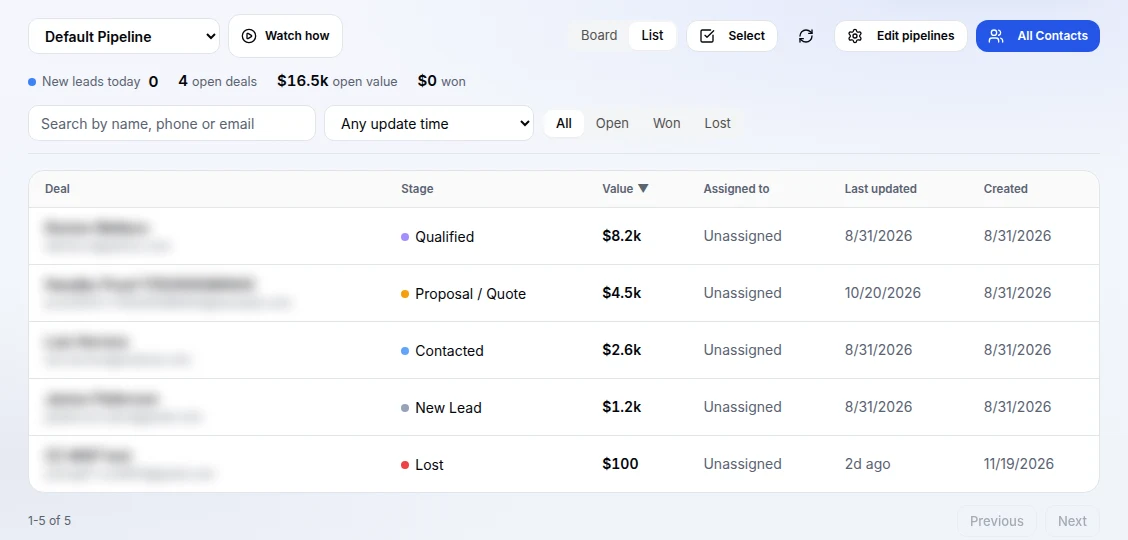 List view sorted by Value. Deal names and emails are blurred in this screenshot.
-
Press Board to go back to the cards.
Good to know
The list shows the deals in the pipeline you picked in the menu at the top left. The numbers above it (open deals, open value, won) stay the same in both views. Long lists are split into pages with Previous and Next under the table.
Who has it
The pipeline is on every plan, Free included, and so is the List view. Plans and what each one includes are on the pricing page.
Try it
Open Pipeline in the app and press List. No account yet? Start free. Curious about the rest of the platform? See pricing.