The problem
A lead comes in, you talk once, and then the week gets busy. Nobody is ignoring them on purpose. But seven days later that person has not heard from you, and they have already talked to someone else.
What it does
As of November 1, 2026, LeedAgent gives you two things.
- A list of leads that went quiet. One click shows every contact with no activity in 7 days or more, newest first.
- Follow-up reminders you set yourself. Pick a time, add a note, and optionally attach a contact. When the time comes, LeedAgent sends the reminder to the places you chose: email, text message, Telegram or browser push.
How to use it
-
Open the contacts list with the quiet leads filter: app.leedagent.com/crm?needs_follow_up=1. The banner reads "Showing leads with no activity in 7 days or more, newest first." The No reply 7+ days button in the filter row is the same idea. Press Show all contacts or Dismiss to go back to the full list.
 The banner on the contacts list. Press Show all contacts to leave the filter.
-
Open Today in the left menu and press Add. Choose Follow-up reminder ("Remind me to follow up, contact optional").
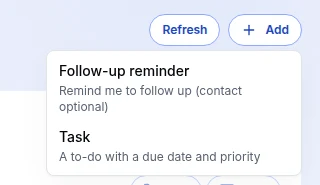 The Add menu on Today.
-
Write what to follow up on, for example "Call back about the quote". Pick the date and time (it starts at tomorrow 9:00 AM). Search for a contact if the reminder is about one person. If you leave the contact empty, the reminder is just for you. Press Save.
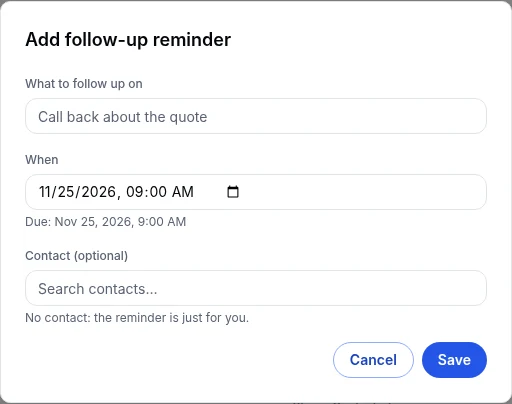 Note, time, and an optional contact.
-
Choose where reminders go. Open Settings > Profile > Notifications and find CRM Follow-up and Client Portal Alerts. Tick any of Text message, Telegram, Email and Browser push. Text needs a business phone with an approved texting sender. Telegram needs to be connected in Settings > Integrations. Browser push needs to be turned on in the browser you use.
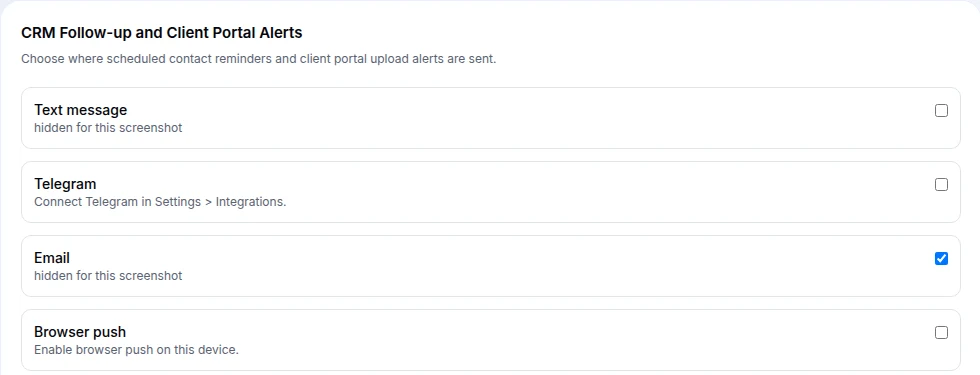 Four channels. Only the account owner or an admin can change them.
Who has it
The contacts list is on every plan, Free included. The Today page, text messages and the inbox start at Solo; the plan details are on the pricing page. Members of a community get the features their host's plan includes.
Try it
Open your quiet leads list now: Contacts with no activity in 7+ days. No account yet? Start free.